
Skincare
Redesigning The Musical Keyboard With Light-Up Buttons
Jun
For centuries, the piano keyboard has looked like a tiny black-and-white city skyline: elegant, familiar, and slightly intimidating if you do not already know where middle C is hiding. It is a brilliant design for many things, but it is not exactly beginner-friendly when the mission is to understand chords, scales, intervals, and harmony without feeling like you accidentally enrolled in music theory boot camp.
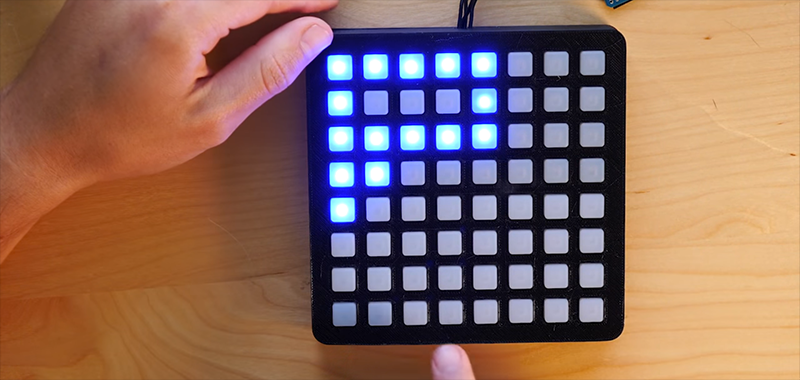
That is why the idea of redesigning the musical keyboard with light-up buttons is so exciting. Instead of treating the keyboard as a fixed row of white and black keys, designers can turn it into a responsive, visual, programmable surface. Buttons can glow to show scales, chords, roots, mistakes, modes, loops, or performance zones. Suddenly, the instrument is not just something you play. It becomes something that teaches, guides, and occasionally saves you from pressing a suspicious note that had no business attending that chord party.
Projects such as the Kord Kontroller, modern RGB pad controllers, ROLI’s light-up learning keyboards, Ableton Push, Novation Launchpad, and Roger Linn’s LinnStrument all point toward the same larger question: what if a musical keyboard could show the logic of music instead of making beginners hunt for it like buried treasure?
Why Redesign the Musical Keyboard at All?
The traditional piano keyboard is powerful because it maps pitch in a simple left-to-right direction. Low notes live on the left, high notes live on the right, and the repeating black-key pattern gives players visual landmarks. That layout has helped generations of pianists, composers, producers, and movie villains dramatically play diminished chords during thunderstorms.
But the piano layout also has limitations. A C major chord, F major chord, and B major chord do not feel identical under the hand. The same scale pattern changes from key to key. Beginners must learn not only sound relationships but also several finger shapes, black-key combinations, and hand positions. For advanced players, that challenge becomes expressive vocabulary. For beginners, it can feel like trying to solve a crossword puzzle while wearing mittens.
A button-based musical keyboard can attack the problem from a different angle. Instead of arranging notes only by absolute pitch, it can arrange them by musical relationship: root, third, fifth, seventh, ninth, scale degree, mode, chord quality, or circle of fifths position. Add LEDs, and the instrument gains a visual language. A glowing button can say, “This is the root.” Another can say, “This is safe.” A red one can say, “Bold choice, jazz wizard.”
The Kord Kontroller: A Chord-First Way to Think
The Kord Kontroller concept is one of the clearest examples of this redesign philosophy. Rather than forcing every player to begin with the standard piano grid, it emphasizes common tonal relationships in Western music theory. Its goal is not merely to replace keys with buttons. The deeper idea is to make chords easier to understand by arranging notes according to how they function inside a key.
In a typical piano lesson, a student learns that a chord is built from scale degrees such as 1, 3, and 5. That explanation makes sense on paper. On a piano, however, the hand shape can change as soon as the key changes. The Kord Kontroller flips the experience: select a key, and the buttons map chord tones such as 1, 3, 5, 7, 9, 11, and 13 into repeatable positions. Minor chords, altered tones, extensions, and octave changes can be handled with additional rows and modifiers.
That approach is powerful because it treats harmony as a physical pattern. A beginner can play a major chord, move to another key, and keep the same relationship-based shape. The instrument becomes less about memorizing every possible chord spelling and more about hearing how musical functions behave. In other words, it turns music theory from a dusty textbook into a light-up control panel. Finally, the circle of fifths gets to feel like a useful tool instead of a mysterious dinner plate from a theory classroom.
Light-Up Buttons Make Music Visible
Light is not just decoration. In a musical interface, lighting can reduce confusion, guide practice, and make performance more readable. A light-up keyboard can show which notes belong to a scale, which buttons trigger clips, which chord tones are active, or which pads are ready for recording. This kind of visual feedback is already central to many music controllers.
Novation’s Launchpad family popularized the 64-pad RGB grid as a performance and production tool, especially for Ableton Live users. Ableton Push also uses an illuminated pad grid, with modern versions adding expressive MPE-enabled pads and RGB backlighting. ROLI’s Piano M and ROLI Piano take the light-up concept into learning, using glowing keys and app-based views to guide students from game-like note following toward more traditional notation. Roger Linn’s LinnStrument uses lights to identify scale notes, root notes, and playable patterns on a multidimensional grid.
The common thread is simple: when the instrument lights up intelligently, it lowers the mental overhead. Players do not need to remember every hidden rule at once. They can see structure, then gradually internalize it. Good lighting does not replace musicianship; it creates a runway for it.
MIDI: The Secret Language Behind the Glow
A light-up button keyboard needs more than pretty LEDs. It needs a way to communicate with software, synthesizers, samplers, and digital audio workstations. That is where MIDI comes in. MIDI, short for Musical Instrument Digital Interface, allows devices to exchange performance information such as notes, velocity, control changes, program changes, and expression data.
For a redesigned keyboard, MIDI is the bridge between button presses and sound. Press a button, and the controller sends a note message. Release it, and the controller sends a note-off message. Twist a knob, slide a finger, or press harder on a sensor, and the controller can send additional data to shape the sound. The keyboard itself may not produce audio at all. Instead, it becomes the brainy remote control for software instruments, hardware synthesizers, lighting systems, or live performance rigs.
Modern expressive controllers also benefit from MPE, or MIDI Polyphonic Expression. MPE allows individual notes in a chord to carry their own pitch bend, pressure, and timbral changes. That matters because traditional keyboard expression often affects all notes together. With MPE, one note can bend upward while another remains steady. A chord can shimmer, stretch, or breathe like a small electronic creature that has been fed after midnight.
From Piano Keys to Isomorphic Layouts
One major design idea behind button keyboards is the isomorphic layout. In an isomorphic musical keyboard, intervals and chords keep the same shape when moved to another key. Guitarists already enjoy a version of this benefit: move a chord shape up the neck, and the relationship between the notes stays consistent. Piano players do not get that same luxury in every key.
Isomorphic button layouts can make transposition easier because the player learns shapes based on intervals, not just note names. A major chord shape can remain a major chord shape wherever it is moved. A scale pattern can stay consistent across keys. This is especially helpful for electronic musicians, composers, and beginners who want to experiment with harmony quickly.
Of course, there is a trade-off. A new layout means new muscle memory. A pianist with ten years of experience may look at a grid of glowing buttons and feel as if the keyboard has been rearranged by a mischievous raccoon. But for new learners or digital-first musicians, the advantage is enormous: the instrument can be designed around musical logic rather than historical inheritance.
What a Light-Up Button Keyboard Can Do Better
1. Teach Chords Faster
A chord-focused layout can show roots, thirds, fifths, sevenths, and extensions directly. Instead of memorizing that Cmaj9 contains C, E, G, B, and D, the player can see the chord tones grouped as functional buttons. This is excellent for songwriting because it encourages experimentation without demanding instant fluency in notation.
2. Make Scales Less Scary
Scales can be displayed with colored LEDs. Root notes might glow blue, safe scale tones green, and altered notes amber or red. A beginner can improvise inside a mode without needing to recite the whole pattern first. The lights become training wheels, and unlike actual training wheels, they do not make your bicycle look uncool.
3. Support Live Performance
For producers and electronic musicians, illuminated buttons can show clip status, drum racks, loop triggers, mute states, or scene launches. A performer can glance down and know what is active. This matters on stage, where lighting is dramatic, adrenaline is high, and the laptop screen is usually trying to reflect your own nervous face back at you.
4. Improve Accessibility
Lights, tactile bumps, high-contrast modes, and customizable layouts can make instruments more approachable for players with different learning styles or physical needs. A button grid can be made smaller, flatter, more compact, or more responsive than a traditional keyboard. It can also offer alternative ways to navigate harmony without requiring wide hand spans.
5. Encourage Composition
When chord tones are grouped logically, composing becomes more playful. A player can start with a root, add a third, experiment with sevenths, and sprinkle in ninths without needing to stop and decode every note. The result is not “cheating.” It is interface design doing what good interface design should do: removing friction between an idea and its execution.
Design Challenges: Where the Buttons Fight Back
Redesigning a musical keyboard is not as simple as buying LEDs in bulk and yelling “innovation!” at a soldering iron. A great light-up button instrument has to solve several practical problems.
First, the buttons must feel musical. Cheap buttons can make a performance feel like typing a password into an elevator. Musicians need responsiveness, consistent triggering, low latency, and enough physical feedback to build confidence. If velocity or pressure sensing is included, the sensors must be reliable and expressive.
Second, the lighting system must be meaningful. Too many colors can become visual soup. A beginner-friendly keyboard should use color consistently: one color for roots, another for scale tones, another for active notes, and perhaps another for warnings or mode changes. If every button is blinking like a tiny nightclub, the player may learn nothing except how to squint.
Third, the layout must balance freedom and guidance. Locking a player into one scale can be useful for practice, but it can also limit creativity. Good designs should let users step outside the “safe” notes when they want tension, chromatic movement, bluesy bends, or the kind of wrong note that becomes right if you repeat it with confidence.
Finally, a redesigned keyboard must connect with the wider music ecosystem. MIDI compatibility, USB-C, Bluetooth, DAW mapping, firmware updates, and custom modes are not glamorous, but they determine whether the device becomes a real instrument or a beautiful desk ornament.
Who Benefits Most From This Kind of Keyboard?
A light-up button keyboard can help several groups of musicians. Beginners benefit because visual feedback reduces the fear of getting started. Songwriters benefit because chord-first layouts make harmony faster to explore. Electronic producers benefit because grids map naturally to clips, loops, samples, and drum patterns. Educators benefit because the instrument can demonstrate theory visually. Experimental performers benefit because custom layouts can create new techniques that traditional keys never anticipated.
It is especially useful for people who think in patterns. Many musicians do not begin with notation; they begin with shapes, colors, rhythm, and repetition. A programmable button keyboard respects that. It says, “You can understand music through relationships first, and names later.” That is a refreshing message for anyone who has ever stared at sheet music and wondered why tiny black dots were judging them.
The Future of Musical Keyboard Design
The future is unlikely to replace the piano keyboard entirely. The classic layout is too useful, too established, and too deeply woven into music education and performance. But redesigned musical keyboards can sit beside it, offering alternative paths into creativity.
Expect future instruments to combine light-up guidance, MPE expression, AI-assisted practice, customizable scales, haptic feedback, and deeper DAW integration. A keyboard may soon detect what you are trying to play, suggest chord extensions, light possible bass notes, or show a smoother voice-leading path. For learners, that could mean less confusion. For professionals, it could mean faster arrangement and performance workflows.
The best designs will not make music “automatic.” They will make it more understandable. They will show why a chord works, where tension lives, and how one idea can move into another. That is the real promise of redesigning the musical keyboard with light-up buttons: not replacing musicians, but helping more people become one.
Hands-On Experience: What It Feels Like to Use a Light-Up Button Keyboard
The first thing you notice when using a light-up button keyboard is how quickly your eyes become part of your hands. On a normal keyboard, your fingers hunt for shapes that your brain has memorized. On a glowing button controller, the instrument actively points to the musical landscape. The root note is no longer an abstract concept. It is the button that keeps shining at you like it knows it is important.
For beginners, this can feel liberating. Instead of spending the first session worrying about whether a note is “allowed,” you can start making sound immediately. Choose a key, watch the safe notes light up, press a few buttons, and suddenly you are improvising. Is it Carnegie Hall? No. Is it better than quitting after five minutes because the keyboard looks like a math test? Absolutely.
The experience becomes even more interesting with chords. A chord-first layout encourages you to build harmony by stacking musical functions. Press the root, add the third, add the fifth, then try the seventh. You begin to hear the emotional difference between a plain triad and a richer chord. Add a ninth and the sound opens up. Add the wrong altered tone and the chord briefly sounds like it stepped on a Lego, but even that teaches you something.
In songwriting, the biggest advantage is momentum. Traditional theory can slow down a rough idea because you stop to ask, “What chord is this?” A light-up button system lets you stay in the creative flow. You can test progressions by moving relationship patterns instead of rebuilding every chord from scratch. That makes it easier to sketch songs, create loops, and experiment with harmonic color.
In live performance, the visual feedback feels like a safety net. Active pads, muted clips, selected scales, and triggered sounds can all be visible at a glance. That does not remove the need for practice, but it reduces the chance of launching the wrong section at the wrong time. Every electronic musician knows the horror of pressing one mystery button and summoning the bridge three minutes early. LEDs help keep the chaos domesticated.
The drawbacks are real, too. Some players may become too dependent on the lights and avoid learning deeper listening skills. Color systems can also be confusing if they are inconsistent between apps or devices. And no matter how clever the layout is, the physical feel matters. If the buttons are mushy, stiff, loud, or unreliable, the magic fades quickly. A musical instrument has to invite touch, not merely survive it.
Still, the experience is memorable because it makes music feel approachable. A light-up button keyboard turns theory into something visible, touchable, and playful. It does not shame you for not knowing every inversion. It simply says, “Here are the relationships. Try them.” For many people, that invitation is enough to move from curiosity to practiceand from practice to actual music.
Conclusion
Redesigning the musical keyboard with light-up buttons is not a gimmick; it is a serious rethink of how people learn, compose, and perform. By combining MIDI, RGB feedback, chord-based layouts, isomorphic thinking, and expressive controls, designers can create instruments that reveal the structure of music instead of hiding it behind years of memorization.
The traditional piano keyboard will remain essential, but it no longer has to be the only doorway into harmony. A glowing grid, a chord controller, or a smart learning keyboard can make music theory more visual, improvisation less intimidating, and composition more immediate. The future of the keyboard may not be black and white. It may be colorful, programmable, pressure-sensitive, and just cheeky enough to make practice feel like play.

