
Body Care
Dell Ultrasharp U2719DX Review: For Work and Creativity
May
Some monitors shout for attention with RGB lights, spaceship stands, and refresh rates that sound like they belong in a racing game. The Dell Ultrasharp U2719DX does the opposite. It quietly walks into the room wearing a clean black suit, places a color-accurate 27-inch QHD panel on your desk, and says, “Let’s get some work done.” And honestly? That is exactly why this monitor still deserves attention from office users, designers, students, remote workers, and creative professionals who care more about sharp text and reliable color than winning a neon-lit gaming tournament.
This Dell Ultrasharp U2719DX review looks at the monitor from a practical angle: how it performs for productivity, design work, writing, editing, multitasking, and everyday creative use. The U2719DX is not a brand-new monitor, and that matters. It lacks modern luxuries like USB-C power delivery, HDR, high-refresh gaming features, and built-in speakers. But it also delivers the kind of fundamentals people still look for in a dependable work monitor: a 27-inch IPS display, 2560 x 1440 resolution, strong ergonomics, thin bezels, a USB hub, DisplayPort daisy-chaining, and factory-calibrated color.
In other words, it is not the monitor you buy to flex. It is the monitor you buy because spreadsheets, photos, browser tabs, dashboards, design mockups, and email threads are all fighting for space on your deskand the U2719DX helps keep the peace.
Dell Ultrasharp U2719DX Specs at a Glance
Before diving into the experience, here is the quick technical picture. The Dell Ultrasharp U2719DX is a 27-inch monitor with a QHD 2560 x 1440 resolution, a 16:9 aspect ratio, and an IPS panel. That combination gives you a noticeably sharper image than a standard 1080p monitor without demanding as much graphics power as a 4K display.
The monitor offers about 109 pixels per inch, which is a comfortable density for reading, editing, and multitasking. Text looks crisp, interface elements do not feel microscopic, and most users can work comfortably without aggressive scaling. For productivity, that balance is one of the U2719DX’s biggest strengths.
Key specifications include:
- 27-inch IPS panel
- 2560 x 1440 QHD resolution
- 60Hz refresh rate
- 5ms response time in Fast mode and 8ms in Normal mode
- Typical 350-nit brightness
- 1000:1 typical contrast ratio
- 99% sRGB color coverage
- 99% Rec.709 and 85% DCI-P3 coverage
- Factory calibration with average Delta E < 2
- HDMI 1.4, DisplayPort 1.4, DisplayPort out with MST
- USB 3.0 upstream and downstream ports
- 3.5mm audio line-out
- Tilt, swivel, pivot, and height adjustment
- 100mm x 100mm VESA mounting support
That spec list tells the whole story: this is a serious productivity monitor with creator-friendly color, not a gaming-first display. It is built for people who care about documents, timelines, images, web design, video previews, and long work sessions. If your desk is a cockpit of browser tabs and open apps, the U2719DX feels like a meaningful upgrade from a smaller or lower-resolution screen.
Design: Clean, Slim, and Office-Friendly
Dell’s UltraSharp monitors have long been popular in offices for one simple reason: they do not look silly. The U2719DX has a restrained, professional design with thin bezels and a slim profile. The “InfinityEdge” style makes the screen feel modern even by today’s standards, especially in a dual-monitor setup where thick borders can make two displays feel like they are separated by a tiny highway.
The stand is one of the strongest parts of the design. It allows height adjustment, tilt, swivel, and pivot, so you can position the monitor exactly where you want it. That sounds boring until you spend eight hours staring at a display that sits too low, too high, or slightly crooked like it is judging your posture. A good stand is not glamorous, but your neck will send thank-you notes.
Cable management is also handled well. The stand includes a cable-routing hole that keeps wires from exploding across the desk like electronic spaghetti. The monitor is sturdy without feeling bulky, and the overall footprint is reasonable for a 27-inch display.
Image Quality: Sharp, Balanced, and Easy to Trust
The main reason to consider the Dell Ultrasharp U2719DX is image quality. The 27-inch QHD panel gives you a practical amount of workspace. Compared with a 24-inch 1080p monitor, you get more room for side-by-side windows, sharper text, and a cleaner layout for creative software.
For writers, coders, editors, researchers, and office workers, QHD is a sweet spot. You can keep a document open beside a browser, compare two files, stretch a spreadsheet without feeling trapped, or keep a project management board visible while answering messages. It is not as pixel-dense as 4K, but it avoids the scaling quirks and higher hardware demands that sometimes come with 4K monitors.
The IPS panel provides wide viewing angles, which means colors and brightness remain consistent when viewed from the side. That helps when sharing work with a coworker, client, or friend who insists on standing slightly off-center like a mysterious movie critic. The anti-glare coating also helps reduce reflections in bright offices, though direct sunlight blasting across the screen will still win that battle.
Color Accuracy for Creative Work
Color accuracy is one of the U2719DX’s headline strengths. The monitor is factory calibrated for 99% sRGB coverage with average Delta E below 2, which is strong for a mainstream professional monitor. It also supports 99% Rec.709 and 85% DCI-P3, making it useful for web design, photo editing, social media graphics, YouTube thumbnails, video previews, and general creative work.
For creators who publish mainly online, sRGB accuracy is especially important. Most web images, app interfaces, digital ads, blog graphics, and social media visuals are still designed around sRGB. When a monitor handles that color space well, your edits are less likely to look oddly oversaturated or dull on other screens.
Is the Dell Ultrasharp U2719DX a perfect high-end color grading monitor? No. It is not built for elite cinema workflows, HDR mastering, or print professionals who require wide Adobe RGB coverage and hardware calibration. But for photographers, content creators, marketers, UI designers, bloggers, and small business owners, it offers trustworthy color right out of the box. That is valuable because nobody wants to spend a Saturday afternoon calibrating a monitor unless they are being paid or avoiding yard work.
Performance for Work and Productivity
For office use, the U2719DX is excellent. The screen size and resolution work well for multitasking, and the ergonomics make long sessions more comfortable. It is particularly useful for people who regularly work with multiple windows: email on one side, a spreadsheet on another, and a browser tab somewhere pretending not to be a distraction.
The 27-inch QHD layout gives you enough room to work without making the desktop feel overwhelming. On a 32-inch monitor, some people feel like they are sitting in the front row of a movie theater. On a 27-inch QHD display, everything feels manageable. You get space, clarity, and comfort without needing to swivel your head like you are watching tennis.
Dell Display Manager adds another productivity advantage for Windows users. The software can help organize application windows into preset layouts, making it easier to snap programs into zones. This is especially handy for multitaskers who use the same window arrangements every day. Designers can keep tools on one side and a canvas in the middle. Writers can keep research notes visible. Analysts can keep dashboards and spreadsheets neatly arranged instead of scattered like digital confetti.
Connectivity: Useful, but Missing USB-C
The U2719DX includes HDMI, DisplayPort, DisplayPort out with MST, USB 3.0 ports, and an audio line-out jack. The DisplayPort out connection allows daisy-chaining a second compatible monitor, which is a helpful feature for clean multi-monitor workstations.
The built-in USB hub is another practical touch. Once connected to your computer through the upstream USB port, the monitor’s downstream ports can handle peripherals such as a keyboard, mouse, webcam, flash drive, or charging cable. It is not as elegant as a modern USB-C hub monitor, but it still helps reduce desk clutter.
The biggest omission is USB-C. If you use a modern laptop and want one-cable docking with video, data, and charging, the U2719DX will feel dated. You can still connect many laptops using adapters or docks, but the experience is not as seamless as newer UltraSharp models with USB-C power delivery.
There are also no built-in speakers. For some people, that is a problem. For others, it is a blessing in disguise, because built-in monitor speakers often sound like a podcast being played through a cereal box. The audio line-out is useful if you want to route sound to external speakers, but you should plan on separate audio hardware.
Gaming Performance: Fine for Casual Play, Not for Esports
The Dell Ultrasharp U2719DX is not a gaming monitor, and it does not pretend to be one. It has a 60Hz refresh rate and no FreeSync or G-Sync support. Response time is acceptable for everyday use and casual gaming, but competitive gamers will be better served by a 144Hz, 165Hz, or faster display.
For single-player games, strategy titles, turn-based games, casual adventures, and occasional after-work gaming, the monitor is perfectly usable. The QHD resolution looks sharp, colors are pleasant, and the IPS panel makes games look clean and vibrant. But if you play fast shooters, racing games, or competitive esports, the U2719DX will not give you the motion smoothness or low-latency feel of a gaming-focused panel.
That is not really a flaw; it is a trade-off. This monitor was designed for productivity and creative reliability, not for helping you blame your teammates in ultra-smooth 240Hz.
Strengths of the Dell Ultrasharp U2719DX
The biggest strength of the U2719DX is balance. It combines a sharp 27-inch QHD screen, accurate color, excellent adjustability, and practical connectivity in a clean package. It feels like a monitor made by people who understand office desks.
The factory calibration is a major plus for creators who want dependable color without buying a specialized professional display. The ergonomic stand is another standout feature, especially compared with cheaper monitors that only tilt and then call it a day. Thin bezels make it appealing for dual-monitor setups, and the USB hub adds useful convenience.
The U2719DX is also easy to live with. The on-screen display is straightforward, the physical controls are simple enough, and the design does not dominate a workspace. It looks professional in a home office, design studio, corporate environment, or college desk setup.
Weaknesses and Limitations
The most obvious weakness is the lack of USB-C. For laptop users, this is the feature most likely to make the monitor feel older. Modern USB-C monitors can turn one cable into a full docking solution. The U2719DX cannot do that on its own.
Another limitation is the 60Hz refresh rate. It is fine for work, video, browsing, and casual entertainment, but not ideal for serious gaming. The contrast ratio is typical for IPS panels, so black levels are not as deep as what you would get from a VA or OLED display. In a dark room, black scenes may look grayish, especially during movies or games.
The monitor also lacks HDR, built-in speakers, and higher-end color features for advanced production workflows. If you need 4K resolution, USB-C docking, high-refresh performance, mini-LED brightness, or OLED contrast, you should look at newer displays. But if your priority is a dependable work-and-creativity monitor, the U2719DX still makes sense when priced appropriately.
Who Should Buy the Dell Ultrasharp U2719DX?
The Dell Ultrasharp U2719DX is best for professionals who want a comfortable, accurate, no-nonsense monitor for daily work. It is a strong fit for writers, editors, developers, designers, marketers, teachers, analysts, photographers, office workers, and remote employees.
It is especially appealing if you want QHD resolution instead of 4K. QHD gives you a large workspace without forcing tiny text or relying heavily on scaling. It also works well with a wide range of laptops and desktops, including systems that may struggle to drive 4K smoothly.
This monitor is less ideal for hardcore gamers, HDR video editors, MacBook users who want single-cable USB-C docking, or professionals who need advanced wide-gamut color workflows. For those users, newer UltraSharp models or specialized creative monitors may be better choices.
Real-World Experience: Living With the Dell Ultrasharp U2719DX
Using the Dell Ultrasharp U2719DX for daily work feels refreshingly uneventfulin the best possible way. A great work monitor should disappear into the routine. It should not make you fight with weird scaling, awkward viewing angles, wobbly stands, or colors that make every photo look like it was edited during a power outage. The U2719DX mostly avoids those problems.
For writing and research, the 27-inch QHD screen is a sweet productivity zone. You can place a document on one side and research material on the other without feeling cramped. Long articles, reports, scripts, and academic papers are easier to manage because the text stays crisp and readable. If you have ever tried to write with five browser tabs stacked behind a tiny document window, moving to this monitor feels like upgrading from a studio apartment to a place with actual closets.
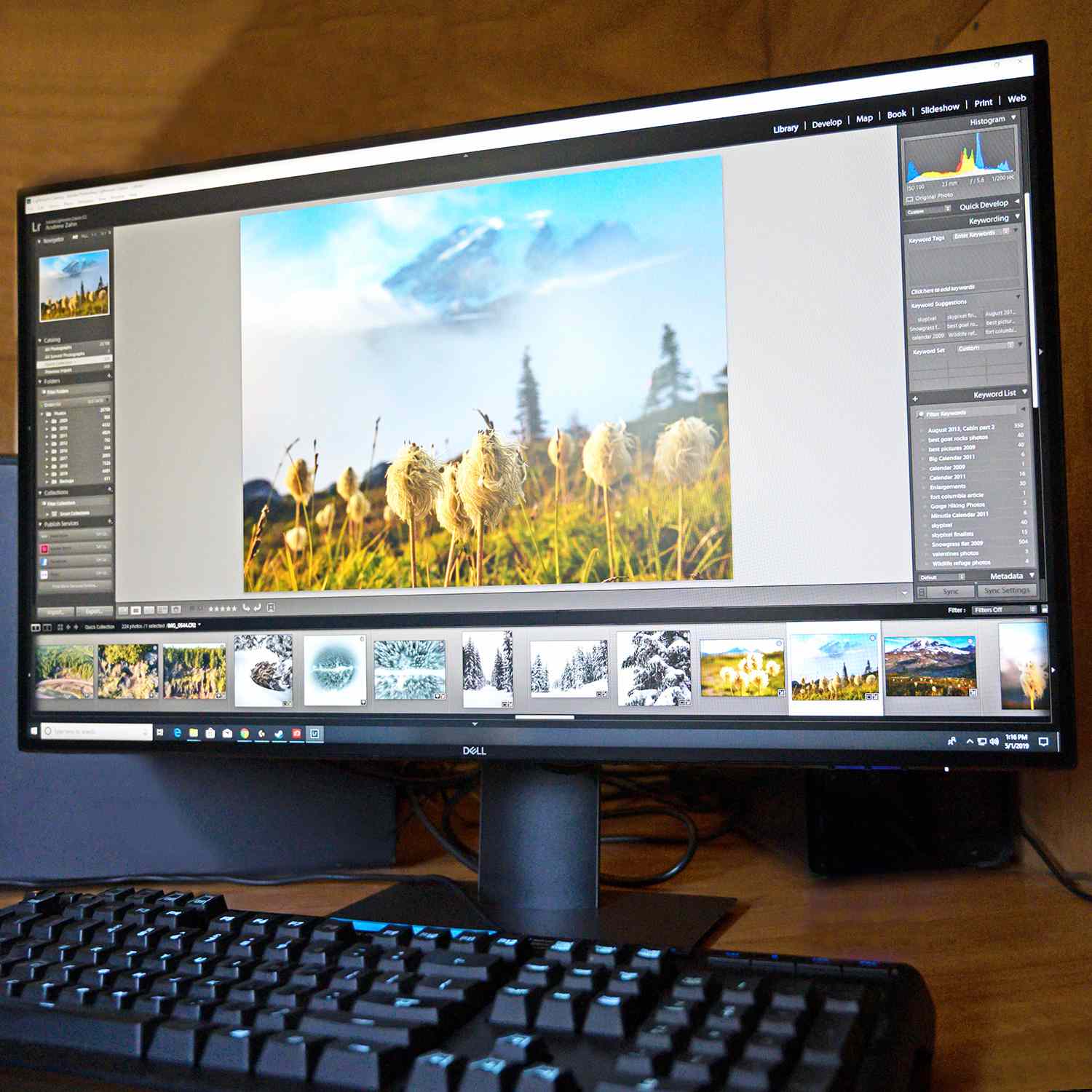
For creative tasks, the monitor gives you confidence. Editing blog images, adjusting product photos, building presentation slides, creating social graphics, and reviewing website layouts all feel more controlled because the display is sharp and color-consistent. You still need good lighting and proper workflow habits, but the monitor does not constantly second-guess you. Skin tones look natural, white backgrounds look clean, and gradients are handled smoothly enough for everyday design work.
In a home office, the adjustability matters more than expected. Being able to raise the screen to eye level helps posture. Swiveling the display makes it easy to show someone else your work. Pivoting into portrait mode is genuinely useful for coding, reading long documents, editing vertical layouts, or reviewing mobile-style designs. It is one of those features you may ignore at first and then suddenly use all the time.
The USB hub is also practical. Plugging a keyboard, mouse, or webcam into the monitor keeps the desktop cleaner. It is not as modern as USB-C docking, but it is still helpful if your tower sits under the desk or your laptop has limited ports. The monitor becomes a small command center rather than just a screen.
The thin bezels make the U2719DX pleasant in a dual-monitor setup. Two of these monitors side by side create a wide, clean workspace for spreadsheets, editing timelines, dashboards, and communication apps. Even pairing it with another 1440p display works well. The uniform design helps the setup look intentional instead of assembled during a clearance sale with questionable judgment.
Where you notice the limitations is entertainment and gaming. Movies look good in a normally lit room, but the IPS contrast means dark scenes lack the depth of newer OLED or strong VA panels. Games look sharp and colorful, but motion does not feel as fluid as a high-refresh monitor. For casual gaming after work, it is fine. For competitive gaming, it is like wearing dress shoes to a sprint: technically possible, not the best idea.
The lack of USB-C becomes more noticeable if you use a recent laptop. A separate dock or adapter solves the problem, but it adds extra cables and cost. Users with desktop PCs may not care, while laptop-first users should consider whether a newer USB-C monitor would better fit their workflow.
Overall, the day-to-day experience is calm, sharp, and professional. The Dell Ultrasharp U2719DX does not try to be everything. It focuses on the basics that matter for work and creativity: comfortable size, strong ergonomics, clean design, reliable color, and enough connectivity for a tidy setup. That focus is why it still feels useful even in a market full of flashier displays.
Final Verdict: A Smart Monitor for Work and Creativity
The Dell Ultrasharp U2719DX remains a strong choice for users who want a dependable 27-inch QHD monitor for productivity and creative work. Its sharp IPS panel, accurate sRGB color, excellent stand, thin bezels, and practical USB hub make it easy to recommend for offices, studios, and home workstations.
It is not the best monitor for gamers, HDR enthusiasts, or USB-C laptop docking. It is also not the newest option in Dell’s UltraSharp lineup. But when judged as a work-focused monitor, the U2719DX still gets the essentials right. It is comfortable, clean, accurate, and practicalthe monitor equivalent of a really good desk chair that does not squeak during meetings.
If you can find it at a fair price, the Dell Ultrasharp U2719DX is still worth considering for work and creativity. It proves that a monitor does not need to be loud, flashy, or overloaded with gimmicks to be excellent. Sometimes, the best screen is simply the one that helps you get things done and makes your work look the way it should.
Note: This article is based on real public product specifications and independent review consensus, rewritten in original standard American English for web publication.

