
Body Care
Creating Full Color Images On Thermoformed Parts
Jun
Thermoformed plastic parts are everywhere: retail displays, medical device housings, aircraft panels, automotive trim, vending machine fronts, kiosk coverch fancier than its humble sheet-plastic beginnings. Add full color images to those parts, and suddenly a plain molded surface becomes a branded product, a control panel, a product story, or a visual “please pick me” from across the aisle.
Creating full color images on thermoformed parts sounds simple at first: print a picture, heat the plastic, form it over a mold, and admire your masterpiece. In reality, the plastic has a mischievous personality. It stretches, thins, bends, softens, shrinks, and sometimes behaves like it had a triple espresso before production. The secret is not just good printing. It is the careful marriage of artwork, material selection, ink chemistry, forming temperature, mold design, surface preparation, and quality control.
This guide explains how full color graphics are created on thermoformed plastic parts, what methods work best, what can go wrong, and how manufacturers can turn a flat printed sheet into a sharp, durable, three-dimensional product without making the logo look like it went through a funhouse mirror.
What Are Thermoformed Parts?
Thermoforming is a plastics manufacturing process that begins with a flat thermoplastic sheet. The sheet is heated until it becomes flexible, then shaped over or into a mold using vacuum, pressure, mechanical force, or a combination of these methods. After cooling, the formed part is trimmed, routed, punched, or otherwise finished into its final shape.
Common thermoforming methods include vacuum forming, pressure forming, twin-sheet forming, and drape forming. Vacuum forming uses atmospheric pressure to pull heated plastic against a mold. Pressure forming adds compressed air, allowing sharper details, crisper edges, and more refined surface definition. For decorated parts, that added detail can be valuable because graphics must align with features, curves, recesses, buttons, windows, edges, and branding zones.
Thermoforming is popular because it can produce large parts, relatively lightweight components, and attractive shapes with lower tooling costs than many injection molding projects. It is especially useful for medium and large panels, covers, trays, enclosures, and display pieces. When full color images are added, thermoforming becomes both a manufacturing process and a visual communication tool.
Why Add Full Color Images to Thermoformed Plastic?
Full color images help plastic parts do more than hold a shape. They can sell, guide, protect, explain, and differentiate. A thermoformed part with integrated graphics may replace separate labels, stickers, painted details, or secondary assembly steps. That can reduce labor, improve consistency, and give the finished product a cleaner appearance.
For example, a retail display tray can include realistic product imagery. A medical device cover can include durable instructions and warning icons. A vehicle interior panel can mimic carbon fiber, brushed metal, woodgrain, or a custom color pattern. A point-of-purchase sign can feature photographic graphics formed into dramatic curves. In other words, the part stops being “just plastic” and starts behaving like a tiny marketing department wearing safety glasses.
Full color decoration can also improve durability compared with surface-applied stickers, especially when the image is protected under a clear film, laminated layer, or molded surface. In many applications, graphics must resist abrasion, cleaning chemicals, sunlight, moisture, handling, and repeated use. Choosing the right decorating method is what separates a long-lasting part from one that looks tired after its third coffee spill.
Main Methods for Creating Full Color Images on Thermoformed Parts
There is no single best method for every project. The right approach depends on the part geometry, production volume, budget, durability requirements, resin type, image complexity, color expectations, and whether decoration happens before or after forming.
1. Distortion Printing Before Thermoforming
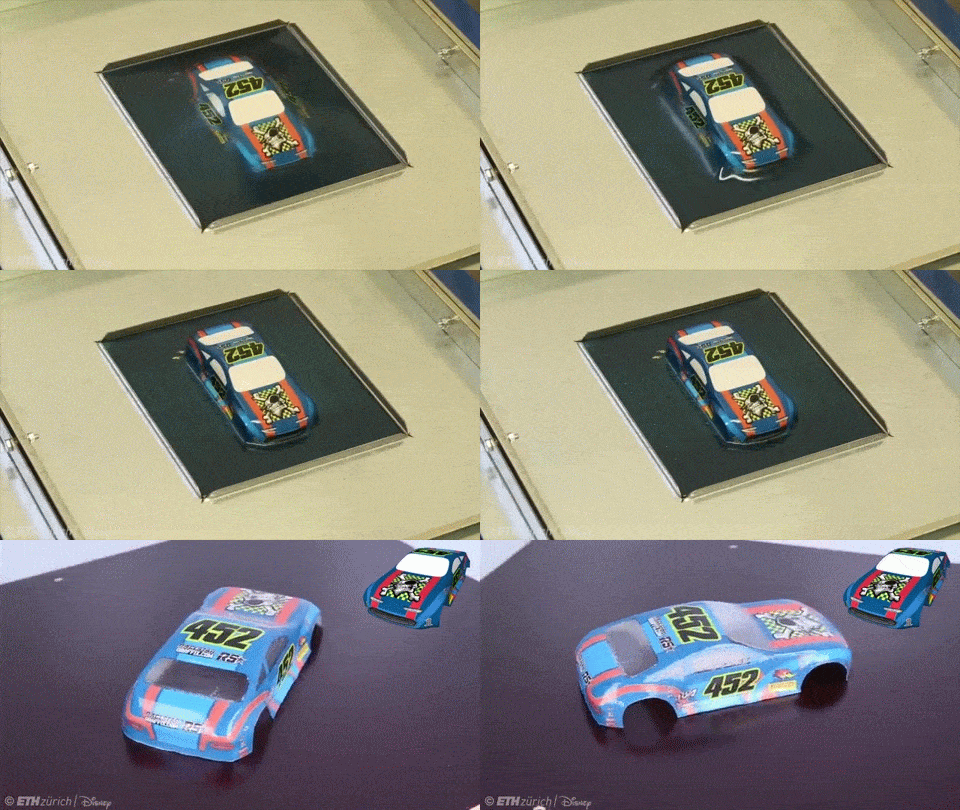
Distortion printing is one of the most important techniques for full color images on thermoformed parts. The basic idea is clever: instead of printing the final-looking image on a flat sheet, the printer creates a deliberately distorted version of the image. When the sheet is heated and formed, the stretching of the plastic pulls the graphic into the correct visual position on the final three-dimensional part.
This process is especially useful for large plastic parts, signage, aircraft interior panels, appliance parts, displays, and components where the artwork must wrap around curves or land accurately on specific molded areas. The challenge is that plastic does not stretch evenly. Corners, deep draws, radii, and vertical walls may distort the image more than flat or shallow areas. If the artwork is not compensated properly, circles become ovals, faces become suspiciously alien, and text may wander away from where it belongs.
A typical distortion printing workflow starts with a CAD model or physical mold, a grid test, and forming trials. The manufacturer prints a reference grid on the plastic sheet, forms it, measures the distortion, and uses that data to adjust the artwork. Once the image compensation is dialed in, the full color artwork is printed in its pre-distorted form and then thermoformed into the final shape.
2. Digital Printing on Flat Plastic Sheets
Digital printing has made short-run and customized decorated thermoformed parts much more practical. Instead of creating screens for every color or design variation, a flatbed digital printer can print full color images directly onto plastic sheets before forming. This is useful for prototypes, limited editions, personalized products, seasonal graphics, test-market packaging, trade show displays, and branded panels with frequent design changes.
Digital printing allows photographic detail, gradients, variable data, and complex artwork. However, the printer, ink, and plastic must be compatible with the forming process. The ink must stretch without cracking, maintain adhesion after heating, and preserve color quality after deformation. Some inks are designed specifically for thermoforming applications, while standard rigid UV inks may fail if the plastic is drawn deeply.
Digital printing is often paired with clear coats, laminates, or protective films to improve abrasion resistance and chemical resistance. For products exposed to sunlight, UV stability and fade resistance should be tested. Nobody wants a premium display panel to turn into a sad pastel version of itself after a few months near a window.
3. Screen Printing for Durable Graphics
Screen printing remains a strong option for thermoformed graphics, especially when production runs are large enough to justify setup. It can deposit thicker ink films than many digital systems, producing bold colors, strong opacity, spot colors, metallic effects, and durable layers. Screen printing is also widely used for backlit panels, instrument panels, overlays, and decorative plastic sheets.
For full color images, screen printing may use four-color process inks, spot colors, or a hybrid approach. The artwork can still require distortion compensation before forming. Screen printing is less flexible than digital printing for frequent design changes, but it can be highly repeatable and cost-effective at scale.
The biggest considerations are registration, ink flexibility, curing, and compatibility with the plastic sheet. Inks must be fully cured before forming, but they must not become so brittle that they crack during the draw. This is where experienced printers earn their coffee.
4. Film Insert Decoration and In-Mold Decoration Concepts
Film insert decoration uses a printed film that is formed and integrated with the plastic part. In some manufacturing environments, related approaches are called in-mold decoration, in-mold labeling, or film insert molding. Although these terms are often associated with injection molding, the same design thinking matters for thermoformed parts: print the graphic on a film, form it to the desired shape, trim it, and bond or integrate it with the final component.
Decorative films can protect the ink by placing it behind a clear surface layer. This produces a premium finish and helps defend the image from scratches, cleaning chemicals, and handling. Film options may include polycarbonate, polyester, acrylic, PETG, or multilayer constructions depending on the application. Polycarbonate films are popular where impact resistance, clarity, heat resistance, and formability are important.
Film-based decoration is often selected for automotive interiors, appliance panels, control surfaces, medical housings, consumer electronics, and other parts where graphics must look polished and survive real use. It can also create textures, gloss levels, matte finishes, woodgrain effects, metallic looks, and hidden-until-lit graphics.
5. Post-Forming Printing and Decoration
Not every image is printed before forming. Some parts are decorated after thermoforming using pad printing, screen printing, digital direct-to-object printing, decals, labels, wraps, hydrographics, paint, or hot stamping. Post-forming decoration is helpful when graphics are small, located on relatively flat areas, or when artwork does not need to stretch across complex geometry.
Pad printing is useful for irregular surfaces, small logos, icons, and markings. Screen printing can work on flatter formed areas. Direct-to-object digital printing may be suitable for certain shapes and production setups. However, full photographic images across a heavily contoured part are usually easier to manage when printing happens before forming with distortion compensation.
Post-forming decoration may also be preferred when the plastic is difficult to print before forming, when heat would damage the ink, or when different customers need different graphics on the same base part.
Choosing the Right Plastic Material
Material selection has a major impact on image quality. A plastic sheet must form well, accept ink or film, survive the application environment, and maintain the intended look. Common thermoforming materials include ABS, HIPS, PETG, polycarbonate, acrylic, PVC, polyethylene, and polypropylene.
ABS is widely used for housings, panels, and durable components because it offers good impact strength and formability. PETG is valued for clarity, toughness, and printability. Polycarbonate is strong, clear, and heat resistant, making it useful for demanding decorated parts. Acrylic offers excellent optical clarity and a premium appearance, though it can be more brittle than some alternatives. HIPS is economical and easy to form, often used in displays and packaging. Polypropylene and polyethylene can be tougher for ink adhesion because of their lower surface energy, so they often require special treatment or primers.
Sheet thickness also matters. Deep draws thin the plastic, and thinning can reduce color density or make images appear lighter in stretched areas. If the printed image must wrap into deep cavities, the design team should account for thinning, gloss changes, and possible loss of detail.
Ink Adhesion: The Quiet Hero of the Whole Project
Full color graphics are only as good as their bond to the plastic. Ink adhesion depends on surface energy, ink chemistry, curing method, cleanliness, plastic type, and forming conditions. Dust, oils, silicone contamination, mold release agents, and static can all interfere with printing. Plastic sheets should be clean, properly handled, and stored in a controlled environment before decoration.
Some plastics accept ink readily, while others need help. Surface treatments such as corona treatment, plasma treatment, flame treatment, or primers can increase surface energy and improve adhesion. These processes change the surface just enough to make inks, coatings, or adhesives bond more reliably.
Testing is essential. Crosshatch adhesion tests, tape tests, abrasion tests, solvent rub tests, weathering tests, and forming trials can reveal whether the print will survive production and real-world use. A graphic that looks beautiful on a flat sample may fail after heating, stretching, trimming, or cleaning. The sample stage is where small problems should be invited to show themselves before they become expensive problems wearing steel-toed boots.
Designing Artwork for Thermoformed Graphics
Designing full color images for thermoformed parts is different from designing for a flat poster. The artwork must respond to three-dimensional geometry. Important text, logos, faces, QR codes, warning labels, and alignment marks should not be placed in high-stretch areas unless the distortion can be carefully controlled.
Designers should identify safe zones, stretch zones, trim zones, and hidden areas. They should avoid placing tiny type on steep sidewalls, deep corners, or tight radii. Images with forgiving textures, gradients, or patterns may tolerate distortion better than precise geometric graphics. A woodgrain can stretch gracefully. A perfectly round company seal may not be so forgiving.
Color management is another key issue. Colors can shift after forming because ink thickness changes as the sheet stretches. Backlit parts need special attention because transmitted light can reveal thin spots, banding, or registration problems. White ink layers, barrier coats, and opacity strategies may be needed to maintain brightness and contrast.
The Production Workflow: From Concept to Finished Part
A successful full color thermoformed part usually follows a structured workflow. The first step is defining the application: indoor or outdoor use, expected lifespan, cleaning chemicals, handling level, color targets, part geometry, production volume, and budget. Next comes material selection, where the team chooses a plastic sheet and print method that match the performance requirements.
After that, the artwork is prepared using the mold geometry. For complex parts, a distortion grid is printed and formed. The formed grid is measured so the artwork can be warped in the opposite direction. Then a prototype is printed, formed, trimmed, and reviewed. This stage may require several rounds of adjustment.
Once the prototype is approved, production controls are locked in. These include sheet lot, sheet thickness, print settings, curing settings, heating profile, forming temperature, mold temperature, vacuum or pressure timing, trim fixtures, and inspection criteria. Consistency matters because even small changes in forming temperature or sheet position can affect graphic alignment.
Common Problems and How to Avoid Them
Image Distortion
Image distortion happens when artwork is not properly compensated for stretching. The solution is to use accurate mold data, grid testing, and iterative artwork correction. Designers should also keep critical artwork away from severe draw areas whenever possible.
Ink Cracking
Ink cracking usually means the ink system is too brittle, under-cured, over-cured, or not designed for the draw ratio. Use formable inks, confirm curing windows, and run forming tests before production.
Poor Adhesion
Poor adhesion may result from low surface energy, contamination, incompatible ink, or insufficient surface treatment. Cleaning, corona treatment, plasma treatment, flame treatment, primers, and better ink selection can help.
Color Washout
Color washout occurs when stretched areas become thinner and less saturated. Compensation may include artwork adjustments, stronger ink density, white backing layers, or redesigning the graphic layout.
Registration Errors
Registration errors occur when the printed sheet does not align correctly with the mold. Better sheet positioning, repeatable fixtures, printed registration marks, and controlled forming procedures can reduce this problem.
Best Applications for Full Color Thermoformed Parts
Full color thermoformed parts work especially well in retail displays, product packaging, appliance fronts, control panels, transportation interiors, vending machine panels, medical equipment covers, branded trays, amusement displays, museum exhibits, and custom signage. The method is also attractive for companies that want strong branding without attaching separate labels that can peel, wrinkle, or collect dirt around the edges.
For outdoor applications, material and ink durability become more demanding. UV exposure, rain, humidity, heat, cold, cleaning chemicals, and abrasion should all be considered. For medical or food-related parts, regulatory requirements, cleanability, and material safety must be reviewed carefully. The prettier the part, the more important it is to make sure it can still do its day job.
Cost Factors to Consider
The cost of creating full color images on thermoformed parts depends on tooling, printing method, artwork complexity, material selection, part size, draw depth, production volume, testing requirements, and finishing operations. Digital printing can be economical for short runs and design variation. Screen printing may become more cost-effective for larger runs. Film decoration can cost more upfront but may reduce secondary operations and improve durability.
Distortion correction adds development time, but it is often worth the investment. Without it, scrap rates can rise quickly. For complex parts, the smartest budget is not always the cheapest first quote. It is the process that produces repeatable, saleable parts with fewer surprises. In manufacturing, surprises are rarely adorable.
Experience-Based Insights for Creating Full Color Images On Thermoformed Parts
One of the biggest lessons from real-world decorated thermoforming projects is that the artwork should never be treated as the final step. It should be part of the engineering conversation from the beginning. When designers create graphics without understanding the draw depth, trim lines, radii, and forming direction, the production team often has to rescue the design later. Sometimes that rescue is simple. Sometimes it feels like trying to iron a billboard onto a beach ball.
A practical experience-based approach starts with asking where the image truly needs to be perfect. Not every square inch of a formed part carries the same visual importance. A logo on the front face may need precise alignment. A background texture wrapping around a sidewall may only need to look natural. A warning icon must remain readable. A decorative gradient can tolerate more movement. Separating “critical” graphics from “forgiving” graphics makes the whole project easier to control.
Another useful habit is to prototype earlier than feels comfortable. Flat printed samples are helpful, but they do not tell the whole story. A flat sheet may show excellent color, strong detail, and perfect type. Then the same sheet goes through heat and forming, and suddenly the corners lighten, the image shifts, and a once-handsome logo looks like it missed its morning meeting. Formed samples reveal what theory politely hides.
Grid testing is one of the most valuable tools in this process. Printing a grid, forming it, and studying how each area moves gives the team a visual map of distortion. This helps designers pre-warp artwork with much better accuracy. It also helps identify places where artwork should not go. In many projects, the grid test is the difference between guessing and controlling the result.
Material handling is another area where experience matters. Plastic sheets can collect dust, static, fingerprints, and oils. A tiny contaminant can create a print defect, adhesion failure, or visible blemish. Clean storage, gloves, antistatic control, and careful sheet handling may not sound glamorous, but they protect the final appearance. The best print technology in the world cannot fully overcome a dirty sheet.
Teams should also test the actual cleaning and use conditions. A part used in a retail store may face fingerprints and mild cleaners. A medical housing may face stronger disinfectants. A transportation panel may face sunlight, abrasion, and temperature swings. Testing should reflect real life, not wishful thinking. Wishful thinking has never passed an abrasion test.
Finally, communication between the printer, thermoformer, designer, material supplier, and customer is essential. Full color thermoformed graphics sit at the intersection of art and engineering. The best results happen when everyone understands the visual goal, the forming limitations, and the performance requirements. When that collaboration works, the finished part looks intentional, durable, and professionalnot like a flat image that was dragged unwillingly into the third dimension.
Conclusion
Creating full color images on thermoformed parts requires more than printing a pretty picture on plastic. It requires a thoughtful process that combines material science, print technology, forming expertise, surface preparation, artwork compensation, and real-world testing. Whether the project uses distortion printing, digital printing, screen printing, film insert decoration, or post-forming decoration, the goal is the same: produce a colorful, durable, accurate image that survives forming and performs in the final application.
The best projects begin with early planning. Choose the right plastic, select inks that can handle heat and stretch, test adhesion, compensate for distortion, and prototype before production. Done well, full color thermoformed parts can replace labels, improve branding, reduce secondary operations, and create eye-catching products that look sharp from the first sample to the final shipment.
Note: This article is intended for educational and manufacturing-planning purposes. Final material, ink, coating, forming, durability, and compliance decisions should be validated through supplier recommendations and production testing.

